

If you want to grow your business, you need to reach people directly. That might mean pitching your product to a potential partner, offering a job to someone you’d like to hire, or sending a press release to the right journalist. And in most of these cases, the fastest way to start that conversation is by email.
But here’s the problem: email addresses are rarely listed in plain sight. LinkedIn doesn’t show email addresses by default. Even if you know someone’s name and where they work, that’s not always enough to figure out how to reach them.
How email address formats work
Most business email addresses follow simple, predictable patterns. If you’ve ever received an email from someone at a company, you’ve probably seen formats like john.doe@company.com or jdoe@company.com. These aren’t random—they follow naming conventions used across departments, often company-wide.
Understanding these patterns gives you a serious advantage. It means you can often guess a professional email address even if it’s not listed anywhere publicly.
There are a few standard formats that many companies use:
You don’t have to guess blindly. With a bit of digging, you can usually find clues about a company’s email structure.
For example, let’s say you’re trying to reach a marketing manager named Sarah Lin at a software company. You check the “Press” section of the site and see a media contact listed as andrew.miles@company.com. Now you know they’re using the first.last format. That means Sarah’s likely email is sarah.lin@company.com.
Sometimes, you’ll find these patterns in team pages, blog author bylines, or even in PDF documents published on the company’s website. One valid email is usually enough to figure out the format used across the whole organization.
Getting the format right early can save hours. Instead of sending out a list of guesses and waiting for bounce-backs, you can focus on one or two high-probability options and then verify them using tools we’ll cover later in the article.
In short, when you understand how email formats work—and how to confirm them using real-world breadcrumbs—you cut through the guesswork and improve your chances of reaching the right person faster.
Manual search techniques
You don’t always need paid tools to find someone’s work email. With a bit of time and the right approach, you can gather solid leads manually—just using Google, LinkedIn, and a few free verification services. Here’s how to do it step-by-step.
It’s one of the most reliable places to confirm someone’s current job title, company, and spelling of their name. Once you know who you’re looking for, switch to Google and use what’s called an X-Ray search. This just means using a special kind of search query to look inside LinkedIn or a specific website.
For example, if you’re trying to reach a sales director at a company called Brightwave, you can type something like:
site:linkedin.com/in/ “sales director” AND “Brightwave”
This tells Google to find only LinkedIn profiles with the phrase sales director that also mention Brightwave. You can tweak the job title or add a location to narrow things down further.
- Company’s website
Once you know the person’s full name and job title, move on to the company’s website. Check the About Us, Team, or Media sections. Often, you’ll find one or two staff emails listed—usually PR or leadership roles—which can help you figure out the email format they use.
Let’s say you see chris.jones@brightwave.com listed under a press contact. If you’re looking for Taylor Reed, the marketing head, there’s a good chance their email is taylor.reed@brightwave.com.
- Don’t stop at pages
PDFs hosted on the site—like annual reports, job postings, or press releases—often contain direct contact info in the footer or last page. Blog posts may also show author bios with email links.
- SMTP testing
Once you have a shortlist of likely email addresses, use the guess-and-verify method. You try different formats based on the person’s name and confirm which one is valid. There are free tools online that let you test if an email address exists without actually sending anything. These tools ping the mail server to check if the address is real—this is called SMTP testing.
- WHOIS
If none of that works, you can do this method. It pulls registration data about a company’s domain name. Sometimes it includes administrative contact emails—usually for small businesses or startups. Just enter the website’s domain into a WHOIS checker.
Keep in mind that many domains now use privacy protection, so the email may be hidden or replaced with a generic address. And even if you do find a real one, it’s often not the person you’re targeting. Use this method as a last resort, or to find general contacts when other paths are blocked.
Automated email-finder programs
Manual research works well for a few contacts. But if you’re reaching out to dozens—or hundreds—of people, you’ll want to automate the process. That’s where email-finder programs come in. These tools help you uncover work email addresses quickly and at scale, with minimal effort.
Here’s how they typically work. You upload a list of names and companies, and the tool runs a bulk lookup. It compares known email formats, checks internal databases, and sometimes tests addresses in real time to see if they’re valid. The result is a list of likely email addresses—some verified, some estimated, depending on how strong the match is.
Before choosing a tool, it’s important to understand how to evaluate them.
- Accuracy
Some tools give you lots of results fast, but not all of them are valid. Others are more careful and verify each email, which means fewer total addresses but a much higher chance they’ll actually work. If you’re doing personal outreach or targeting senior roles, quality matters more than quantity.
- Integration
Good tools connect smoothly with your CRM, outreach platform, or spreadsheet software. That saves time and avoids copy-paste errors. If your team is running email campaigns or managing leads, this feature alone can make or break your workflow.
- Pricing model
Some platforms charge per search. Others use a monthly subscription that gives you a set number of credits. Depending on your needs—whether it’s a one-time hiring project or ongoing lead generation—it’s worth comparing both options before committing.
These tools generally fall into three categories. Browser extensions let you find emails as you browse LinkedIn or company websites. They’re useful for quick, one-off lookups. Web-based platforms are designed for bulk work—you upload a spreadsheet, and they return a file with the results. And then there are APIs, which allow developers to plug email-finding into custom systems or apps. For example, if your team has its own internal CRM, you could use an API to automatically enrich contacts with verified email addresses behind the scenes.
All-in-one tool for contact collection, verification, and outreach
LetsExtract is a desktop program designed to help businesses and marketers collect email addresses, check if they’re valid, and send bulk emails directly from their computer. It’s made for people who need contact data fast and in large volumes—business owners, freelancers, marketing teams, SEO specialists, and agencies.
LetsExtract combines several tools in one place.
- Email Extractor
Automatically pulls emails and contact details from websites, search engines, and documents. You don’t have to dig manually.
- Email Verifier
Checks if an email address actually exists and is safe to send to. It runs through 10 different checks to filter out fake or outdated contacts.
- Email Sender
Lets you send newsletters or cold emails straight from your desktop. There are no sending limits or platform restrictions, since everything happens locally.
This tool helps speed up email marketing workflows. Instead of jumping between services, you handle collection, cleaning, and sending in one place. For small teams or solo users, that means fewer expenses and less setup.
Because emails go out from your own computer, you don’t pay per email, and there’s no risk of your account being suspended by a third-party service. Built-in verification helps reduce bounce rates by weeding out broken or invalid addresses before you hit send.
LetsExtract works in six languages and is used in more than 30 countries, which makes it handy for international teams or multilingual campaigns.
If you’re looking for a simple tool to gather leads, clean your lists, and send emails without paying for several different services, this one packs it all into one box.
You can also try it for free with a trial version.
Legal & compliance considerations
If your outreach crosses legal lines—even by accident—you risk fines, lost trust, or getting blacklisted by mail providers. To stay safe, you need to understand how data privacy laws work, when consent is necessary, and what’s considered ethical in cold outreach.
Different regions have different rules.
- GDPR (European Union)
It requires that you have a legal basis to contact someone, especially if you’re using their personal data. This includes names, personal email addresses, or anything that can identify a person.
- CAN-SPAM (United States)
It allows you to email someone without prior consent, as long as you include a way to opt out and clearly state who you are.
- CCPA (California)
Focuses on how personal data is collected and used, especially for marketing purposes. If your business targets California residents—even if you’re based elsewhere—you may fall under its scope.
The key point is whether you’re contacting a personal or a professional address. A message to john.doe@gmail.com falls under stricter rules than one sent to john.doe@company.com because the first is clearly personal. Still, even with business emails, consent can matter.
If someone requests not to be contacted, you’re expected to honor that, whether legally required or not. Ignoring opt-outs or scraping emails from sources that forbid it (like private directories) isn’t just a legal issue—it damages your brand.
To protect yourself, build simple habits into your workflow:
- Keep a record of when and where you found an email.
- If someone opts out, mark it immediately and don’t contact them again. Use tools or spreadsheets to manage this.
- If you’re sending bulk outreach, make sure every email includes a clear way for the person to unsubscribe.
FAQ: More about finding emails
What’s the most accurate free method to find an email address?
If you’re working with no budget, the most reliable option is to identify the company’s email format and confirm it manually. Most companies follow standard patterns like firstname.lastname@domain.com or firstinitiallastname@domain.com. Once you know the format, check the person’s name on LinkedIn and test a few logical combinations using a free email verification tool. You can often find clues on the company’s “About Us” page, press releases, or PDF reports.
A byline like “Contact Jane at jane.smith@company.com gives away the pattern instantly. This workflow takes time but offers solid accuracy—especially when you double-check deliverability before sending anything.
Are there legal limits to how many emails I can send?
There’s no strict number, but there are clear limits in how you send them. In the U.S., the CAN-SPAM Act doesn’t cap your daily emails but requires you to follow key rules: no misleading subject lines, include your contact details, and give people a way to opt out. If you ignore opt-outs or send to scraped personal emails without permission, you can get flagged or even fined.
On the technical side, if you send too many emails without warming up your domain or checking your list, your messages might land in spam—even if they’re legal. So quantity isn’t the issue. Quality and intent are what matter.
How do I update my list when employees change roles?
People switch jobs all the time, so your email list gets outdated quickly if you don’t maintain it. The easiest approach is to check in every few months. Run your list through a verification service to see which emails bounce.
For high-priority contacts, look them up on LinkedIn to see if they’ve moved to another company, and then repeat the process of identifying the new domain and format. If someone leaves and their email still works—like info@ or press@—treat it as a placeholder. But don’t rely on it long-term. A clean list helps your emails land in inboxes and protects your sender reputation.
It's time to try LetsExtract (it's free)
 Click here to download the LetsExtract Email Studio
The trial version will allow you to create a contact list, check email addresses and start mailing.
Related posts:
 Email extractors: a complete guide to charge your lead generation
 Why you shouldn’t buy email lists for your campaigns — risks, laws & better alternatives
 Nonexistent and invalid email addresses: can they be brought back to life?
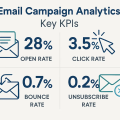 Email campaign analytics: key KPIs
 A/B testing in email campaigns: how to improve ROI
