

Trigger campaigns are emails that are sent automatically after a specific action or event. A person signs up — they receive a welcome email, a customer adds a product to the cart but does not pay — they receive a reminder.
There are several common trigger types that most businesses use:
- signup (welcome email);
- first purchase;
- abandoned cart;
- browse abandonment (looked at products but did not add to cart);
- repeat purchase;
- inactivity;
- birthday or personal date;
- subscription renewal;
- post-purchase follow-up.
For example, a user browses winter jackets on your site in November, leaves without buying, and later that day receives an email with the same category and a short reminder.
Why trigger campaigns matter more during holidays
During holidays, everything moves faster. People compare offers, check delivery dates, and make decisions under time pressure. At the same time, inboxes are crowded: every brand sends promotions, reminders, and discounts. A regular newsletter can easily get lost in that flow.
Trigger campaigns help solve this problem because they are tied to specific actions. If a person shows interest, the email arrives close to that moment. This timing makes a difference. A reminder sent one hour after a cart is abandoned before a holiday sale is much more likely to convert than a general “don’t miss our sale” email sent to everyone.
Trigger emails are more relevant, they reach the user faster, and they require less manual work once set up. Instead of preparing dozens of separate campaigns, the team builds a few logic chains that work throughout the season.
For example, a customer adds a gift to the cart a few days before Christmas but does not complete the purchase. The trigger email includes a message about the last day for delivery. This small detail changes the context: the email is no longer just a reminder, it helps the person make a decision before the deadline.
Holiday email marketing calendar
A holiday email marketing calendar shows which campaigns will be sent, when they will go out, and what each one is supposed to achieve. Without it, most teams work reactively, and the campaign is prepared at the last moment. This leads to predictable problems:
- Emails go out too late.
- Several campaigns overlap and compete with each other.
- Offers are weak because there was no time to think them through.
- Some important dates are missed completely.
A calendar gives a clear view of the entire season. In practice, it does not need to be complex. It can be a shared document where each campaign is described in a structured way:
- date and event;
- target audience;
- campaign goal;
- offer or message;
- channel (email, plus any support channels if needed);
- responsible person;
- status (planned, in progress, ready, sent).
For example, instead of “we should send something for Black Friday,” the calendar contains a clear entry: early access email for loyal customers on Monday, main sale announcement on Friday morning, reminder in the evening, and last call on Sunday.
Which holidays to include in the calendar
A good email calendar covers the whole year. The goal is to build a system where every season has its own campaigns, and each campaign has a clear purpose.
It helps to group events by season:
- In winter, the obvious anchors are New Year, Christmas, and large sale periods like Black Friday and Cyber Monday.
- Early in the year, there are moments like Valentine’s Day.
- Spring brings its own opportunities: Easter, seasonal updates, and “new collection” messages.
- Summer works differently. People travel more, so emails shift toward lighter offers, short promotions, and reminders.
- In autumn, activity grows again with back-to-school campaigns, Halloween, and preparation for year-end sales.
Inside each season, there are several types of events that matter in practice:
- major shopping dates (Black Friday, Cyber Monday, seasonal sales)
- cultural holidays (Christmas, Easter, Valentine’s Day, Mother’s Day)
- seasonal changes (spring refresh, summer offers, back-to-school)
- industry-specific dates (for example, events tied to a product category or service cycle)
- company-specific moments (brand anniversary, product launch, internal promotions)
The same calendar can work for both B2C and B2B teams: a retail brand will push gift ideas before Christmas, a B2B company may use the same period for budget planning emails or end-of-year offers tied to contracts. Back-to-school for one business is about products, and for another, it is about returning to work routines and productivity tools.
15 seasonal email campaign ideas
Seasonal campaigns are easier to manage when they are grouped by timing. Some emails warm up the audience before a holiday, some work during the peak, and others continue after the main activity is over. There are also campaigns that run all year and simply adapt to the season. Here are some good ideas and how they are used in real work.
— Pre-holiday campaigns
- Teaser email that announces an upcoming sale and sets expectations.
- Early access for loyal customers or subscribers.
- Gift guide or selection of products, tailored to different needs.
- Waitlist or sign-up campaign for limited offers.
— Peak-season campaigns
- Main sale announcement with a clear offer and deadline.
- Urgency email with a time limit or stock limit.
- Delivery deadline reminder, especially before major holidays.
- Abandoned cart follow-up adapted to the season.
- Offer update when conditions change (for example, extended sale or new items).
— Post-holiday campaigns
- Thank-you email after purchase or after the season ends.
- Replenishment or repeat purchase reminder based on what was bought.
- Post-purchase care with tips, instructions, or support.
- Reactivation email for users who did not engage during the holiday period.
— Year-round seasonal campaigns
- Birthday or personal milestone email.
- Event-based or context-based email, such as weather-driven offers or reminders tied to user behavior.
For example, a pre-holiday teaser goes out one to two weeks before a major date. It is sent to the full active base and aims to prepare people for the offer. During the peak, an abandoned cart email works differently. It is sent only to users who showed intent and left without buying. It usually goes out within hours and focuses on closing the sale.
To make this system work, the contact base needs to be clean and segmented. If the data is messy, the wrong people receive the wrong messages. This is where preparation tools like LetsExtract can be useful. They help structure and organize contacts before campaigns are launched, so each email reaches the right audience at the right moment.
How to measure whether the campaign worked
Evaluate the main metrics:
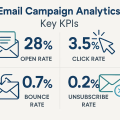
- Open rate shows how many people noticed your email.
- Click rate shows how many were interested enough to act.
- Conversion rate shows how many completed the target action, for example a purchase.
- Revenue per email connects the campaign directly to money.
- Unsubscribe rate shows if the campaign pushed people away.
- List growth shows whether your audience is expanding over time.
Each campaign type has its own priority. Seasonal campaigns should always be compared to your regular emails, this gives context. If your open rate drops during a holiday period, it does not always mean the campaign failed. Inbox competition is higher, so lower numbers can still lead to higher revenue. A more useful comparison is this: how much revenue did one email bring during the season versus a normal period, and how quickly users reacted.
After each campaign, it is worth doing a short review. This does not require a long report. A simple check is enough:
- what was planned and what actually went out;
- which metrics met expectations and which did not;
- where users dropped off (opened but did not click, clicked but did not buy);
- what should be changed next time (timing, segment, offer, wording).
For example, a team runs a holiday sale campaign and sees strong open rates but weak sales. This usually means the subject line worked, but the offer or landing page did not. The next campaign can focus on improving the offer rather than rewriting the email from scratch.
FAQ
What counts as a trigger campaign?
Any email that is sent automatically after a specific action or condition. A signup, a purchase, an abandoned cart, a period of inactivity. If the email depends on behavior, it is a trigger.
How far in advance should a holiday calendar be built?
For major dates, planning usually starts one to three months ahead. This gives enough time to prepare offers, content, and segments. Smaller campaigns can be planned closer to the date, but they should still be visible in the calendar.
How many seasonal campaigns are too many?
There is no fixed number. The limit is defined by audience reaction. If unsubscribe rates grow and engagement drops, the frequency is too high. A common approach is to increase the number of emails during peak periods, but keep each message relevant and tied to a clear reason.
Which holidays matter most?
The ones that match your business model and audience behavior. Large global dates like Black Friday or Christmas are important for many companies. At the same time, smaller or industry-specific events can bring better results because they are more focused.
How to reuse a template without sounding repetitive?
The structure can stay the same, but the message should change. Update the offer, adjust the subject line, and rewrite key parts of the text. For example, the same layout can be used for a spring sale and a summer promotion, but the context and wording should reflect the season.
What to do with inactive subscribers?
Do not include them in every campaign. Use a separate reactivation sequence. If a person does not respond after several attempts, it is better to pause communication. This keeps your metrics cleaner and protects deliverability.
When should holiday campaigns start?
Earlier than most teams expect. Communication usually begins before the peak period. A teaser or early access email warms up the audience, so the main campaign does not arrive cold.
How to avoid sending the wrong message at the wrong time?
Segmentation and basic logic help here. A person who already bought should not receive the same sales push as someone who has not interacted yet. Trigger campaigns also reduce this risk, since they react to real behavior instead of sending one message to everyone.
It's time to try LetsExtract (it's free)
 Click here to download the LetsExtract Email Studio

The trial version will allow you to create a contact list, check email addresses and start mailing.