
A one-day email campaign is about speed and focus. You use it when the situation does not allow long planning and when the message is simple enough to prepare quickly.
This format works best in:
- a product launch that needs immediate attention;
- a short-term promotion or discount;
- an event reminder sent a few hours or a day before it starts;
- a company update or announcement;
- a reactivation email to bring back inactive users;
- a sales push at the end of a reporting period.
For example, a small team realizes that registrations for a webinar are lower than expected. They decide in the morning to send a reminder. By the end of the day, the email is written, checked, and sent to a selected segment.
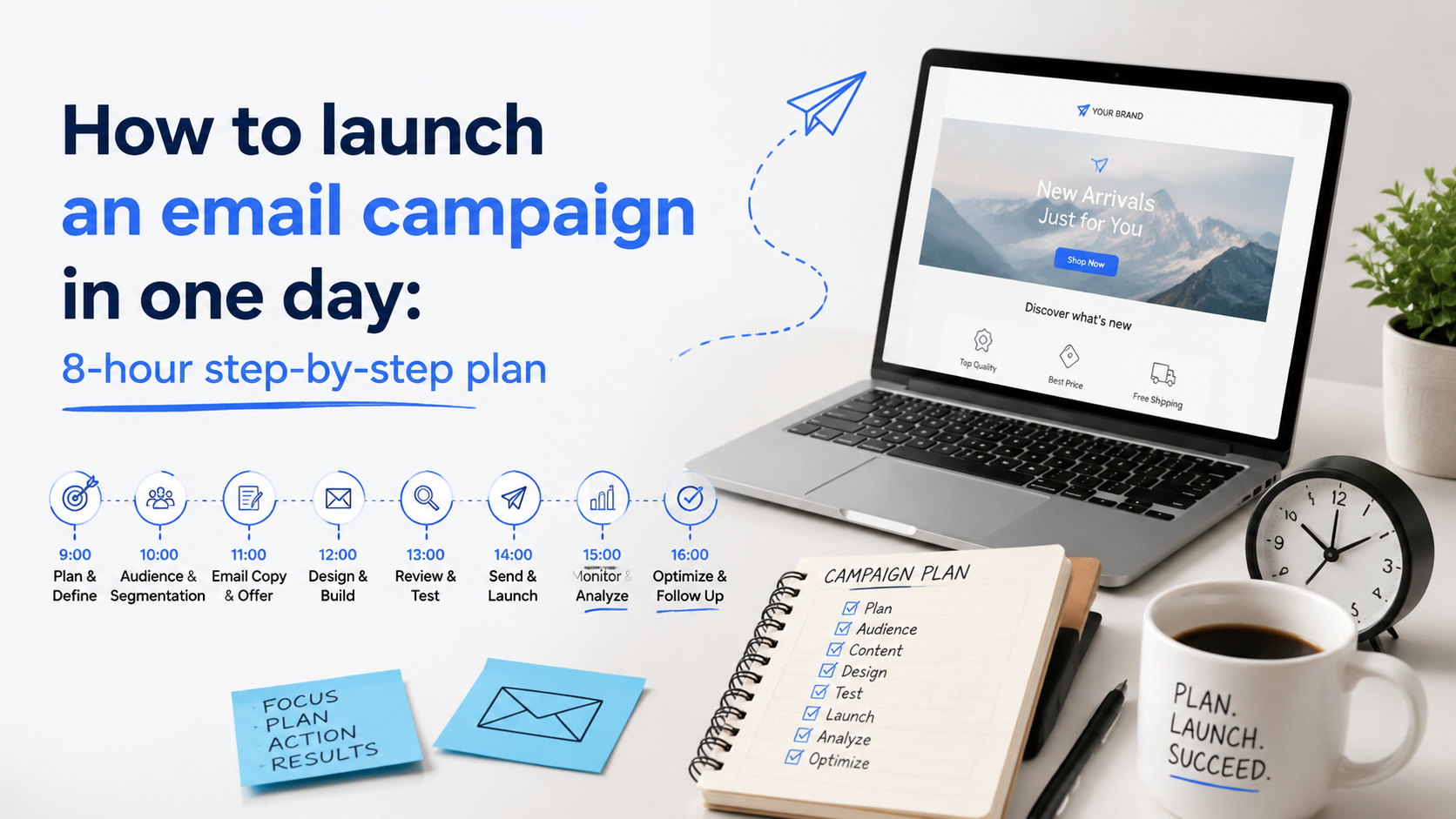
Now let’s move on to the plan for launching an email campaign in 8 hours. The time frame is approximate — some steps will take less time, others more — so feel free to adjust the plan to suit your specific needs.
Hour 1: define the offer
Start by turning that vague request into a concrete measurable goal. It can be sales, clicks, registrations, replies, downloads, or booked calls.
For example, a sales manager may ask for “an email to push the offer.” This is not a goal. A clear version would be: “get 50 demo bookings from existing leads this week.” Now the team knows what result they are aiming for.
This structure helps:
- what you are sending (a discount, an invite, a new feature);
- why now (deadline, limited access, recent update);
- what the reader should do next (click, register, reply, buy).
Hour 2: choose the audience
This is where many fast campaigns go wrong. Teams either send to everyone or spend too much time trying to build a perfect segment.
In most cases, the fastest and safest option is to use existing contacts:
- current customers;
- active leads;
- subscribers who recently engaged with your emails;
- inactive users if the goal is reactivation;
- a narrow group connected to the offer.
If you need to add new contacts, use sources that are already available and lawful. This can include previously collected leads, imported lists that have been cleaned, or contacts gathered from public sources with clear relevance to your offer.
Tools like LetsExtract can help collect such contacts quickly, for example from open directories or public listings. After that, the list should always be checked and verified before sending. This step protects your deliverability and reduces the risk of bounces.
Hour 3: write the details
The subject line has one job: give a clear reason to open. It can do this through clarity, urgency, or light curiosity:
- Clarity — “New feature: faster reporting in your dashboard”.
- Urgency — “Last day to register for the webinar”.
- Curiosity with context — “We changed one thing in your account”.
The preview text supports the subject line. It should add meaning, not repeat the same words. If the subject says “Last day to register,” the preview can explain why it matters: “Join 200+ attendees and get the full recording after the event.”
People decide in a second whether they recognize and trust the sender. So a clear sender name works better than a generic one. The same applies to the email address. It should look stable and familiar, not random or overly technical.
If time allows, test two or three subject line variants. Even small changes in wording can affect open rates. For example, a sales team can try “Get 20% off today” and “20% discount ends tonight” and see which one performs better on a small segment before sending to the rest.
Hour 4: write the email copy
Now you move to the body of the email. A clear structure makes this faster:
- Opening context: why the reader is receiving this email.
- Main benefit: what they get.
- Proof or reason to believe: why this is worth attention.
- Call to action: what to do next.
- Short closing: one final line that supports the action.
For example, a team sending a webinar reminder starts with “You registered for tomorrow’s session,” then explains what the attendee will learn, adds a short detail like “over 300 people already signed up,” and ends with a button: “Join the session.” There is no long introduction and no extra topics.
Tone should match the audience. In B2B emails, readers expect a direct, practical message. They want to understand how this helps their work. In B2C emails, the tone can be lighter and more emotional, but it still needs to be clear. In both cases, the message should feel specific. A generic email that could be sent to anyone rarely works.
Hour 5: make the email easy to read
With the text ready, you turn it into a format people can quickly scan. The reader should see the main message and the action without effort:
- a visible headline or opening line;
- short sections with space between them;
- one clear button or link for the main action;
- readable font size and contrast;
- a layout that adapts to mobile screens.
For a one-day campaign, a clean, standard layout works better than a custom design. Custom elements take time, and they can break in different email clients. A template that has already been used and tested saves time and reduces risk.
Hour 6: check technical moments
At this point, the email is ready. But a small mistake can break the whole campaign: a link does not work, a name is inserted incorrectly, or the email looks wrong on mobile. Fixing this after sending is much harder.
Start with a quick check:
- spelling and clarity of the text;
- all links open the correct pages;
- personalization fields work correctly (no “Hello, {{Name}}”);
- images have alt text in case they do not load;
- the email reads well on a phone;
- the main button or link leads to the expected action.
Deliverability is the second part of this step. This depends on a few basic things: the list should be clean, the message should match the audience, and the email should not look like spam.
Verification matters most when you work with a new or imported list. Old or incorrect addresses increase bounce rates. This can damage your sender reputation and affect future campaigns. A quick check or validation before sending reduces this risk.
Hour 7: choose the send setup
The first question is whether to send everything at once or in parts:
— For small and clean segments, a single send is usually enough.
— For larger or less predictable lists, it is safer to split the send into batches. This reduces load and gives you time to react if something goes wrong.
— A staggered send is useful when you are unsure about the list quality or when the campaign is critical.
For example, a team can send the email to 20% of the segment first, check the initial response, and then continue with the rest.
Timing depends on the audience, not on universal rules. A B2B audience often reacts during working hours. A B2C audience may open emails in the evening or on weekends. If you have past data, use it.
Segmentation and personalization can still be used even in a fast campaign. A simple split by activity, location, or interest already improves relevance. For example, sending a slightly different message to active users and inactive users can increase engagement without adding much work.
Hour 8: launching & results
The first hour after launch gives you important signals.
1. Take a look on the basic metrics
Delivery rate, opens, clicks, unsubscribes, spam complaints, and early replies or conversions. Are people opening the email? Are they clicking the main link? Is there any unusual negative reaction?
2. Check that everything works
Open the email again on different devices, click the links, check that everything works as expected. If you sent the campaign in batches, this is the moment to decide whether to continue or pause and fix something.
A checklist before you hit send
The checklist below will help you avoid simple mistakes that cost real results:
- The goal is clear and measurable (you know what result you expect: clicks, sales, registrations).
- The audience is defined and relevant to the offer.
- The list is clean, with no obvious outdated or risky contacts.
- The subject line is clear and matches the content inside.
- The preview text adds meaning, not repetition.
- The sender name and email look familiar and trustworthy.
- The copy is short, focused, and built around one main action.
- The design is simple, readable, and works on mobile.
- All links lead to the correct pages.
- Personalization fields display correctly.
- The email passes a basic spam check.
- At least one other person has reviewed the email or you have checked it carefully yourself.
FAQ
Can a campaign really be prepared in 8 hours?
Yes, if the campaign is focused. You need a clear goal, a defined audience, and a simple message. If the task grows into multiple segments, complex design, or long approvals, one day is no longer enough. In practice, small teams often launch reminder emails, promotions, or announcements within a working day because the scope is limited.
Should B2B and B2C campaigns use the same structure?
The structure can stay the same: clear opening, benefit, proof, and action. What changes is the content. B2B emails often need more context and a direct link to business value. B2C emails are usually shorter and focus on immediate interest or convenience. The logic is the same, but the message must match the audience.
What is essential and what can be skipped when time is limited?
Essential parts are the goal, the audience, the message, the working links, and the final check. These directly affect results. Optional parts include advanced design, multiple content blocks, or deep personalization. For example, a plain email with clear text and one CTA often performs better than a complex layout that was rushed.
It's time to try LetsExtract (it's free)
 Click here to download the LetsExtract Email Studio
The trial version will allow you to create a contact list, check email addresses and start mailing.